Pages

Search This Blog

Friday, November 11, 2011

NASCAR LIVE on Google TV

Guest post from NASCAR

(A series highlighting the most interesting new apps available for Google TV)

I am excited to announce the first official NASCAR application that has been optimized for the big screen experience – NASCAR.COM LIVE.  When I found out that Google was planning to extend the successful Android Market onto Google TV, I was encouraged by the evolution of the product and began brainstorming on how to make a cool product that NASCAR fans would enjoy.  

To me, NASCAR is a bold sport – its drivers are larger than life, the cars are faster than anything I can relate to, and the competitiveness is measured in milliseconds of granularity that is best viewed in HD.  When we started, we realized that this platform is, first and foremost, about video and so we wanted to put as much video content as we could into the app.  We then thought about how we would use the data we have to soothe some of the pain points of the live TV broadcast.  NASCAR.COM LIVE brings fans the best on-demand HD video clips of the NASCAR Sprint Cup Series, Nationwide Series and the Camping World Truck Series.

When it comes to race day, the TV broadcasts do a great job but there are a number of ways that interactive features can add to the broadcast experience.  The scrolling ticker graphics that are used on TV are a nice way to keep up with the standings in real time but sometimes I really want to know where my favorite driver is.  And I want to know now, not wait until the ticker scrolls through all 43 drivers.  So, we added Live Leaderboard to the “Live mode” of the app to allow fans to scroll through the leaderboard as they wish. 

Another cool feature is our Lap-by-Lap text updates that build up into an archive throughout the race. This provides fans a great summary of the race and gives them a way to analyze on their own terms.  

When you pair Live Leaderboard and Lap-by-Lap with Google TV’s built in picture-in-picture feature then you’ve got a really cool way to watch the race that’s the perfect complement to the TV broadcast.

Finally we realize that the family room is a personal place and often times a social gathering for race events.  Perhaps half of the room has avid and loyal NASCAR fans but your other friends are new to the sport and want to learn more.  That’s why we wanted to put in beautiful high resolution photos of drivers, cars, team information, and use the NASCAR 101 section to teach the basics of the sport.  It’s a fun way to get hooked on racing.

I’m excited about Google TV and the app, but—as with any product—there are always opportunities to make it better. Check out NASCAR.COM LIVE and let us know how we can make the experience even better for you.

The NASCAR app can be found here in Android Market.

Jim Doeden, Associate Product Manager, NASCAR.COM

Wednesday, November 9, 2011

Engadget, Huffington Post, TechCrunch and more all in one shiny new AOL HD app

Guest post from AOL
(A series highlighting the most interesting new apps available for Google TV)

AOL is a new entrant in the connected TV space, we launched our first apps on a handful of platforms over the summer and have been gaining momentum ever since. Our approach was to create an interactive environment that showcased our content and engaged users – yet was simple enough for a regular remote control.

Late this summer, we were invited to Google’s NY offices for a sneak peek at Google TV’s V2 and had the opportunity to test the upcoming release. The user experience was markedly improved and after playing around with it for a while, we knew that our friends in Mountain View had built a real contender in the connected TV space. So we enlisted the help of our crackerjack Android development team in Dulles to port our current release (with all the bells and whistles) to Google TV and in a matter of a few weeks, they delivered a shiny new experience for Google TV.


AOL HD on Google TV features three great channels of video content: Entertainment, Tech, and Home from some of the most trusted sources on the web like the Huffington Post, Engadget, Moviefone and TechCrunch. Each channel features HD videos with hundreds of videos with fresh new content being added every day, so there is always something new to watch.


If you watched the hundreds of hours of video on AOL HD and still need more entertainment, then sit back and find some new music on our CD Listening Party, a unique experience that allows users to listen to a weekly variety of 15-30 newly released albums for free!


You can find AOL HD in Android Market.  If you’d like to learn more or want to contact us, go to http://hd.aol.com.  

We look forward to entertaining you.

Rob Delacruz, General Manager, AOL HD

Tuesday, November 8, 2011

Allrecipes TV helps families tackle “what’s for dinner?” on the best screen in the house

Guest post from Allrecipes
(A series highlighting the most interesting new apps available for Google TV)

All of us with a passion for cooking love it when everyone wants to know how we made it. Sharing our formula for a successful dish is one of the most gratifying experiences for any aspiring home cook. Even that secret recipe which eventually gets leaked, like my personally long held secret Coast-to-Coast Famous Wings recipe.

Nearing our 15th birthday, Allrecipes was started as a way to help people share their favorite recipes, and gather a community of home cooks passionate about practical, kitchen tested, everyday meals that lead to success at the dinner table.

Allrecipes TV showcases the passionate contributions of our members - you can see all of what our entire community of home cooks have been making and sharing, with tens of thousands of recipes, photos, reviews and everything you need to find the next winning meal for your family.

Allrecipes TV brings you “best of” collections - some of the favorite selections from our most popular categories of recipes. You are sure to find a winner among collections from Appetizers to Slow Cooker.


We also have a complete browse-by-category starting with Cuisine, Dish Type, Main Ingredient, Cooking Method, and Occasions.

Of course, every recipe comes packed with a photo gallery, member reviews and tips, and nutrition information. You can also share your favorite recipes via email, Facebook, Twitter or other avenues for social plug-ins you have installed on your Google TV.


Last, but not least, the most commonly requested “how to” videos for cooking techniques, entire recipes, as well as our growing library of web shows, including “What’s Cooking”. We’ll be adding more videos on a regular basis.

We hope you enjoy the app and find lots of great dishes to try, enjoy and share. We’re planning to continue to add new features and make the app even better, so please tell us what you’d like to see.

The Allrecipes app can be found here in Android Market.

Scott Scazafavo, VP Product Management, Allrecipes.com

Friday, October 28, 2011

An Update on Google TV

In the 1970s, there were just a few networks on TV. Cable changed things by adding hundreds of new channels like HBO, ESPN, and MTV. The Internet marks a new chapter for television. This chapter is not about replacing broadcast or cable TV; it’s not about replicating what’s on TV to the Web. It’s about bringing millions of new channels to your TV from the next generation of creators, application developers, and networks. With over three billion views a day, sites like YouTube are proving the demand for Web entertainment is already big, and this entertainment is coming to the living room.

The Google TV platform contributes to this evolution by enabling new content creators to add to the programming you already enjoy on your TV. Given so much choice, we’re committed to delivering the best way to discover and engage with the high-quality entertainment on your television, whether that comes from your cable or satellite provider (DISH, Comcast, DIRECTV, etc.) or from the Web (YouTube, Netflix, and thousands more). The initial version of Google TV wasn’t perfect, but launching it gave us the opportunity to learn. These are still early days, and we’re working hard to move forward with each update.

Today, we’re announcing a software update for Google TV. In this release, we focused on four areas of user feedback:

1. Keep it simple
The interface is now much simpler. The new customizable home screen gets you to your favorite content quickly. And within “all apps” you can see all of your shortcuts, similar to your Android phone or tablet.

2. Make it easy to find something worth watching
We’ve improved search across the board for content from Live TV, Netflix, YouTube, HBO GO, and more. But what if you don’t know what to search for? There’s now an app called “TV & Movies” that let’s you easily browse through 80,000 movies and TV episodes across cable or satellite, Netflix, Amazon, YouTube, and many other sites. If you’ve opted in to recommendations, we can better predict what you want to watch next.

3. Make YouTube better on TV
We’re launching a new YouTube experience specifically built for Google TV. It is now fast and easy to get to your favorite HD-quality YouTube entertainment. And we’ve integrated YouTube more closely with Google TV search, so that you can turn virtually any topic – mountain biking, cooking, etc. – into a channel.

4. Bring more apps to TV
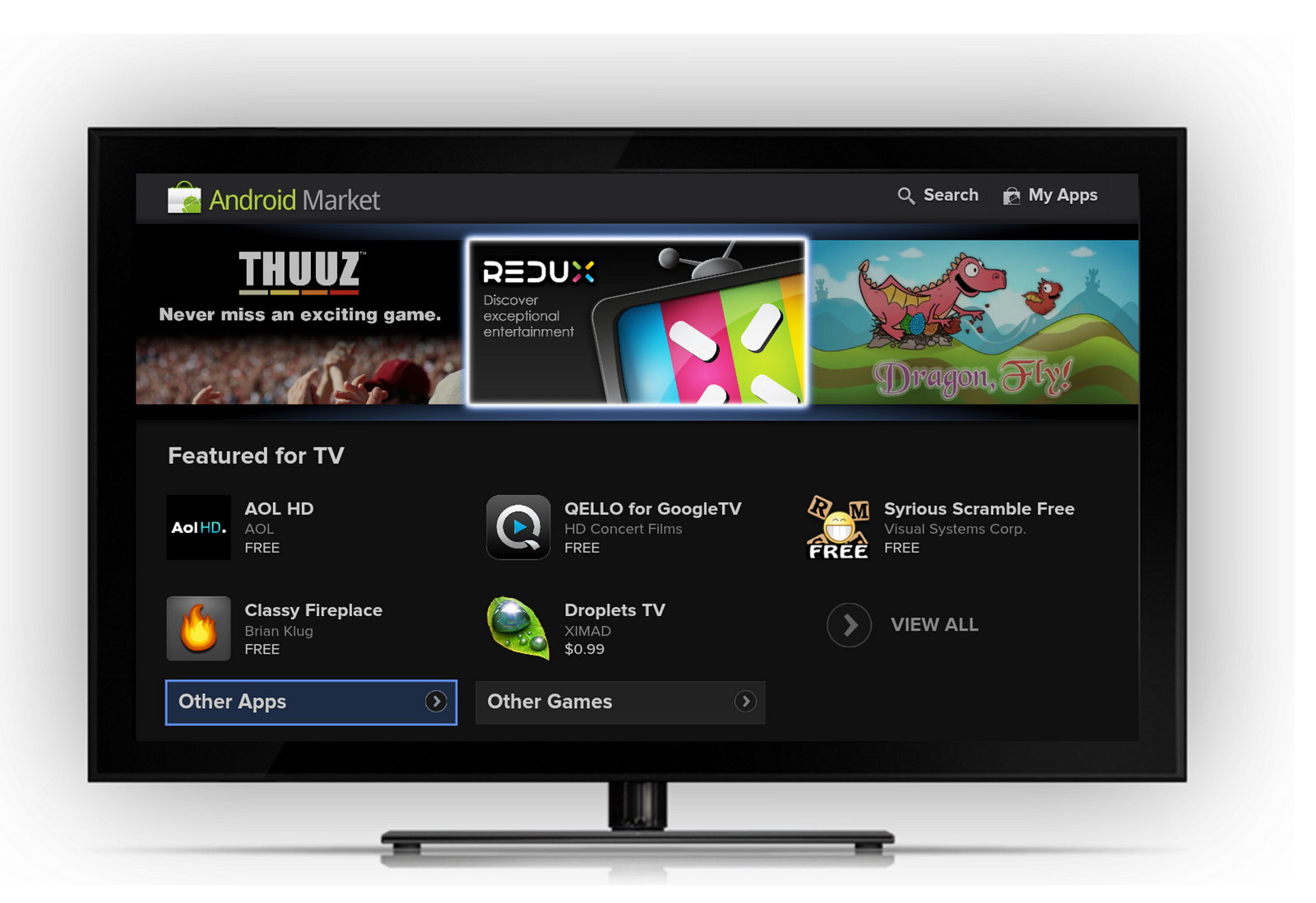
We are opening up the TV to the creativity of content creators large and small through Android Market. Android developers can now bring existing mobile apps or entirely new ones to TV. Initially, the number of apps won’t be large – apps requiring a touch screen, GPS, or telephony won’t show up – but 50 developers have seeded the Market with cool and useful apps for the TV. We’re excited to see the number of apps grow.

This software update will be coming to Sony devices starting early next week and Logitech devices soon thereafter. We look forward in the coming months to announcing new software updates as well as new devices on new chipsets from multiple hardware partners.

Posted by Mario Queiroz, Vice President Product Management, and Vincent Dureau, Director of Engineering

Tuesday, October 11, 2011

Google TV add-on for the Android SDK


A few weeks back we released the preview of the Google TV add-on for Android SDK. Today, we’re releasing the final add-on for the upcoming release of Google TV software.
The differences in this version from the preview release are minor:

  • We heard your feedback, and the Action Bar now renders horizontally, in line with other Android devices. We’ve published code for a left-side navigation bar since that may work better for navigating with D-Pad when you have vertically scrolling lists. Check out an example app built using the sample code here.
  • There are additional keys on the screen for quick access, e.g., picture-in-picture, fast forward, channel up/down, etc. Please note that these keys will only work with the next Android SDK Tools, revision 14.
We’re very excited about the strong interest from the developer community in bringing their apps to TV, and we look forward to continuing to deliver powerful tools which enable innovative forms of entertainment for the living room.


Ambarish Kenghe (AK), Product Manager

Monday, August 22, 2011

Preview of Google TV add-on for the Android SDK


At Google I/O, we announced that Android Market is coming to Google TV. Today, we are excited to announce a preview of the Google TV add-on for the Android SDK. With the upcoming OS update to Honeycomb, Google TV devices will be Android compatible. That means developers can build great new Android apps for TV, optimize existing mobile or tablet apps for TV, and distribute those apps through Android Market.

While the add-on does not contain all features of Google TV, it enables developers to emulate Google TV and build apps using standard Android SDK tools. It also provides new APIs for TV interaction, such as TV channel line-up. Google TV emulation is currently supported on Linux with KVM only, and we are working on support for other operating systems. We’re very happy that through KVM we’ve been able to create a fast Android emulator for TV.

Depending on the design and use case, an existing Android app may work well on Google TV as is, or it may require fixes. With the add-on you can test your apps to determine if they would be a good fit for TV and whether any tweaks are required. We are also publishing UI guidelines to help you with topics like optimizing for d-pad navigation, presenting information for 10-foot viewing, designing apps that work well across devices, etc. The guidelines include information on how certain UI elements on Google TV differ from other Android devices.

As with other devices, apps that require features not supported on Google TV won’t appear in Android Market on Google TV. For example, Google TV-based devices do not have a touchscreen; hence apps which require touchscreen will not appear. Conversely, if the manifest says touchscreen is not required, the app will appear. Please follow our guidelines carefully.

These are still early days for Google TV, and this release is another step in providing developer tools for the big screen. While the number of apps available on TV will initially be small, we expect that through this early release of the add-on you'll be able to bring optimized TV apps into the ecosystem more quickly. To start doing this, download the Google TV add-on today. Also, please continue to reach out to us on the Google TV Android Developer Community forum. We look forward to your contributions!

Ambarish Kenghe (AK), Google TV Product Manager

Thursday, August 4, 2011

MeeGenius Transforms Your TV into an Educational Platform with Google TV

Guest post by MeeGenius!

It’s always hard to say no to your children - especially when they look at you with their pouting little faces. But it is always important to set limits, especially when it comes to reading vs. how much time they spend in front of the TV. Then it dawned on me, TV can be an educational tool. And when when reading can be done on the big screen, all my kids can participate at the same time. TV also expands the learning possibilities of a print book with additional interactive tools. To make this dream a reality, my husband and I built the MeeGenius! app for Google TV.

MeeGenius! brings books to life on the big screen with beautiful illustrations, narration, and word highlighting. The stories are narrated aloud while children follow along with pictures and highlighted text. The narration combined with the word-highlighting promotes early reading skills such as word recognition. The stories include old favorites such as The Gingerbread Man as well as newer titles.


MeeGenius came in handy one late afternoon when my kids were particularly restless and I was trying to get to the finish line on a project. With MeeGenius on Google TV, they could be occupied and educated at the same time! They read book after book, even reading some books multiple times. Later that evening, we read MeeGenius! together. It was the perfect bedtime reading companion.

My children now ask for the “MeeGenius! Channel” on our TV. With more educational apps available on TV, the TV has become an educational tool as well as an entertainment device. The educational opportunities for the TV are very exciting, and I can't wait to develop more of these experiences for the kids - mine and yours!

Wandy Yeap Hoh, Co-Founder

Followers

Popular Posts

Blog Archive