Pages

Search This Blog

Friday, October 28, 2011

An Update on Google TV

In the 1970s, there were just a few networks on TV. Cable changed things by adding hundreds of new channels like HBO, ESPN, and MTV. The Internet marks a new chapter for television. This chapter is not about replacing broadcast or cable TV; it’s not about replicating what’s on TV to the Web. It’s about bringing millions of new channels to your TV from the next generation of creators, application developers, and networks. With over three billion views a day, sites like YouTube are proving the demand for Web entertainment is already big, and this entertainment is coming to the living room.

The Google TV platform contributes to this evolution by enabling new content creators to add to the programming you already enjoy on your TV. Given so much choice, we’re committed to delivering the best way to discover and engage with the high-quality entertainment on your television, whether that comes from your cable or satellite provider (DISH, Comcast, DIRECTV, etc.) or from the Web (YouTube, Netflix, and thousands more). The initial version of Google TV wasn’t perfect, but launching it gave us the opportunity to learn. These are still early days, and we’re working hard to move forward with each update.

Today, we’re announcing a software update for Google TV. In this release, we focused on four areas of user feedback:

1. Keep it simple
The interface is now much simpler. The new customizable home screen gets you to your favorite content quickly. And within “all apps” you can see all of your shortcuts, similar to your Android phone or tablet.

2. Make it easy to find something worth watching
We’ve improved search across the board for content from Live TV, Netflix, YouTube, HBO GO, and more. But what if you don’t know what to search for? There’s now an app called “TV & Movies” that let’s you easily browse through 80,000 movies and TV episodes across cable or satellite, Netflix, Amazon, YouTube, and many other sites. If you’ve opted in to recommendations, we can better predict what you want to watch next.

3. Make YouTube better on TV
We’re launching a new YouTube experience specifically built for Google TV. It is now fast and easy to get to your favorite HD-quality YouTube entertainment. And we’ve integrated YouTube more closely with Google TV search, so that you can turn virtually any topic – mountain biking, cooking, etc. – into a channel.

4. Bring more apps to TV
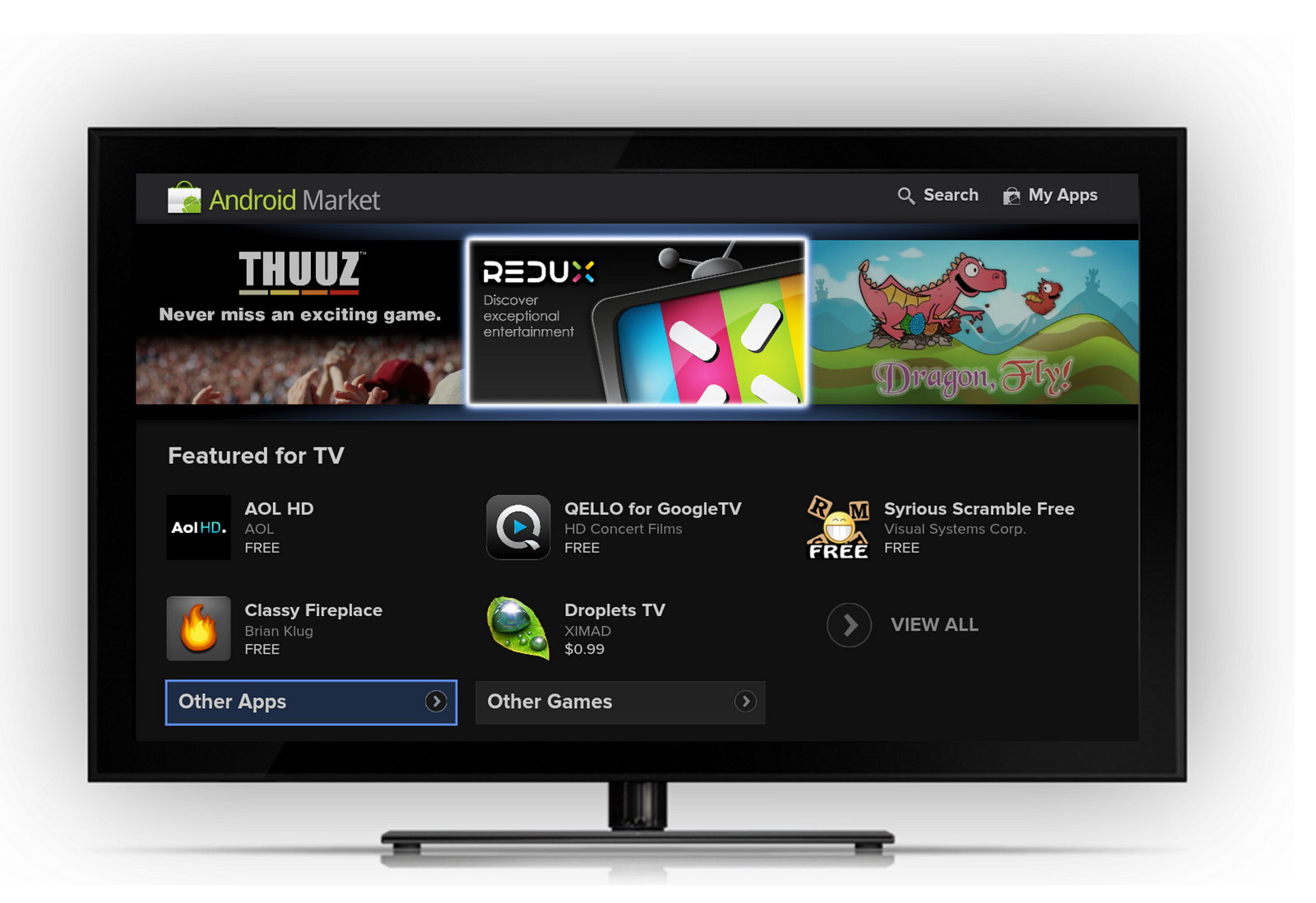
We are opening up the TV to the creativity of content creators large and small through Android Market. Android developers can now bring existing mobile apps or entirely new ones to TV. Initially, the number of apps won’t be large – apps requiring a touch screen, GPS, or telephony won’t show up – but 50 developers have seeded the Market with cool and useful apps for the TV. We’re excited to see the number of apps grow.
This software update will be coming to Sony devices starting early next week and Logitech devices soon thereafter. We look forward in the coming months to announcing new software updates as well as new devices on new chipsets from multiple hardware partners.

Posted by Mario Queiroz, Vice President Product Management, and Vincent Dureau, Director of Engineering

Tuesday, October 11, 2011

Google TV add-on for the Android SDK


A few weeks back we released the preview of the Google TV add-on for Android SDK. Today, we’re releasing the final add-on for the upcoming release of Google TV software.
The differences in this version from the preview release are minor:

  • We heard your feedback, and the Action Bar now renders horizontally, in line with other Android devices. We’ve published code for a left-side navigation bar since that may work better for navigating with D-Pad when you have vertically scrolling lists. Check out an example app built using the sample code here.
  • There are additional keys on the screen for quick access, e.g., picture-in-picture, fast forward, channel up/down, etc. Please note that these keys will only work with the next Android SDK Tools, revision 14.
We’re very excited about the strong interest from the developer community in bringing their apps to TV, and we look forward to continuing to deliver powerful tools which enable innovative forms of entertainment for the living room.


Ambarish Kenghe (AK), Product Manager

Monday, August 22, 2011

Preview of Google TV add-on for the Android SDK


At Google I/O, we announced that Android Market is coming to Google TV. Today, we are excited to announce a preview of the Google TV add-on for the Android SDK. With the upcoming OS update to Honeycomb, Google TV devices will be Android compatible. That means developers can build great new Android apps for TV, optimize existing mobile or tablet apps for TV, and distribute those apps through Android Market.

While the add-on does not contain all features of Google TV, it enables developers to emulate Google TV and build apps using standard Android SDK tools. It also provides new APIs for TV interaction, such as TV channel line-up. Google TV emulation is currently supported on Linux with KVM only, and we are working on support for other operating systems. We’re very happy that through KVM we’ve been able to create a fast Android emulator for TV.

Depending on the design and use case, an existing Android app may work well on Google TV as is, or it may require fixes. With the add-on you can test your apps to determine if they would be a good fit for TV and whether any tweaks are required. We are also publishing UI guidelines to help you with topics like optimizing for d-pad navigation, presenting information for 10-foot viewing, designing apps that work well across devices, etc. The guidelines include information on how certain UI elements on Google TV differ from other Android devices.

As with other devices, apps that require features not supported on Google TV won’t appear in Android Market on Google TV. For example, Google TV-based devices do not have a touchscreen; hence apps which require touchscreen will not appear. Conversely, if the manifest says touchscreen is not required, the app will appear. Please follow our guidelines carefully.

These are still early days for Google TV, and this release is another step in providing developer tools for the big screen. While the number of apps available on TV will initially be small, we expect that through this early release of the add-on you'll be able to bring optimized TV apps into the ecosystem more quickly. To start doing this, download the Google TV add-on today. Also, please continue to reach out to us on the Google TV Android Developer Community forum. We look forward to your contributions!

Ambarish Kenghe (AK), Google TV Product Manager

Thursday, August 4, 2011

MeeGenius Transforms Your TV into an Educational Platform with Google TV

Guest post by MeeGenius!

It’s always hard to say no to your children - especially when they look at you with their pouting little faces. But it is always important to set limits, especially when it comes to reading vs. how much time they spend in front of the TV. Then it dawned on me, TV can be an educational tool. And when when reading can be done on the big screen, all my kids can participate at the same time. TV also expands the learning possibilities of a print book with additional interactive tools. To make this dream a reality, my husband and I built the MeeGenius! app for Google TV.

MeeGenius! brings books to life on the big screen with beautiful illustrations, narration, and word highlighting. The stories are narrated aloud while children follow along with pictures and highlighted text. The narration combined with the word-highlighting promotes early reading skills such as word recognition. The stories include old favorites such as The Gingerbread Man as well as newer titles.


MeeGenius came in handy one late afternoon when my kids were particularly restless and I was trying to get to the finish line on a project. With MeeGenius on Google TV, they could be occupied and educated at the same time! They read book after book, even reading some books multiple times. Later that evening, we read MeeGenius! together. It was the perfect bedtime reading companion.

My children now ask for the “MeeGenius! Channel” on our TV. With more educational apps available on TV, the TV has become an educational tool as well as an entertainment device. The educational opportunities for the TV are very exciting, and I can't wait to develop more of these experiences for the kids - mine and yours!

Wandy Yeap Hoh, Co-Founder

Friday, July 29, 2011

Asus ROG MATRIX GTX 580.

Asus launches ROG MATRIX GTX 580 graphics cards for enthusiasts and gamers.The 19-phase super alloy power technology provides greater overclocking headroom with enhanced power efficiency and component durability.It comes preloaded with a variety of hardware-based tools,including Tweaklt and Probelt for instant overclocking adjustment and measurement.It also has safe mode button for the instant restoration of stable settings at any time.

Sony's Handycam Projector HDR-PJ50

Sony's new projector handycam HDR-PJ50 is perfect for recording and playing back treasured memories.The projector comes with 220GB hard disk drive and can project upto 60" (diagonal) image on any surface without using  any additional plug in wires,cables,television or computer.With this handy cam you can create full HD videos (1920 X 1080 ),while with the 12x optical zoom,you can enjoy close-ups on video capture.

Jailbreak For iOS 4.3.5 Using Redsnow

Apple recently launched iOS 4.3.5 whose jailbreak  was not known to us.But  here it comes the first jailbreak for iOS 4.3.5.Jailbreak iOS 4.3.5 can be done using redsnow.iPhone 4,3GS,iPad and iPOD touch can be easily jailbreakes with redsnow.
         The following instructions will make your work easier to jailbreak your iOS 4.3.5 :   

  1. IT SHOULD BE MUST THAT YOU ARE USING THE LATEST VERSION OF iTUNES 10.4. 
  2. NOW DOWNLOAD iOS 4.3.4 & 4.3.5 AND AFTER THAT DOWNLOAD REDSNOW 0.9.8b4.
  3. OPEN REDSNOW 0.9.8b4.
  4. SEARCH FOR iOS 4.3.3 FIRMWARE FILE AND POINT IT TOWARDS REDSNOW.
  5. CLICK NEXT 
  6. A NEW WINDOW WILL BE OPENED.
  7. INSTALL CYDIA APP.
  8. CLICK NEXT
  9. INSTRUCTIONS WILL BE GIVEN TO YOU TO TURN OF YOUR DEVICE AND CONNECT TO YOUR PC.
  10. JUST FOLLOW THESE INSTRUCTIONS.
  11. YOUR DEVICE WILL BE AUTOMATICALLY SWITCHED TO DFU MODE.
  12. WAIT FOR SOMETIME AND DEVICE WILL BE JAILBREAK TO iOS 4.3.5.                                                                              
Its not at all difficult to jailbreak iOS 4.3.5 using  redsnow


Followers

Popular Posts

Blog Archive